Building a Realistic Typo Generator
Posted on February 16, 2026
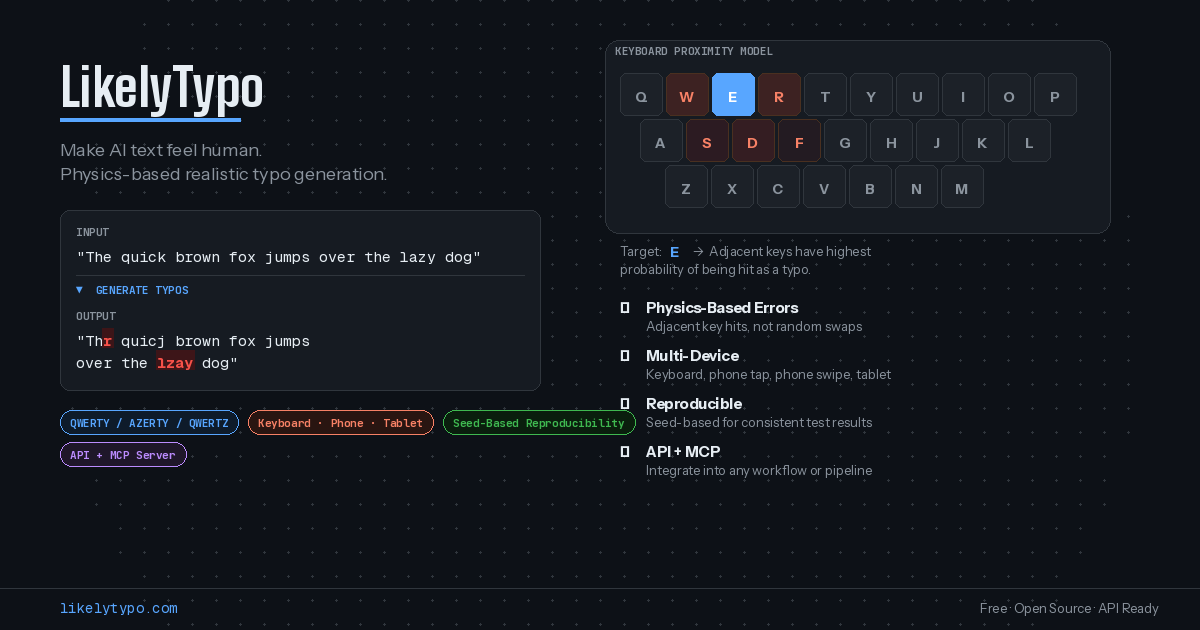
Most typo generators get it wrong. They randomly swap characters, insert garbage, or delete letters at arbitrary positions. The result looks nothing like real human typing errors. If you have ever tried using one to test a spellchecker, create realistic chat dialogue, or make AI-generated text feel more human, you know the output feels synthetic.
Real typos follow the physics of the keyboard. When your finger reaches for the “r” key and misses, it hits “e” or “t” — keys that are physically adjacent. It does not hit “z” on the opposite side of the board. When you type on a phone, the error radius is larger because your thumbs cover more surface area. When you type fast, errors cluster in bursts because rushed fingers compound mistakes.
I built LikelyTypo to model these mechanics properly — and it is completely free to use.
How It Works
Head to likelytypo.com, paste any text, pick your settings, and hit Generate. The tool instantly produces a version of your text with realistic human typing errors. A character-level diff highlights exactly what changed, so you can see every insertion, deletion, and substitution at a glance.
There is no account to create, no rate limit, no watermark. Everything runs directly in your browser — your text never leaves your machine.
Not Random — Physics-Based
The key difference between LikelyTypo and other typo generators is how errors are chosen. Instead of picking random characters, the tool models the physical keyboard. It knows which keys sit next to each other, how far apart they are, and which finger reaches for which key.
When it introduces a typo on the letter “f”, it picks from “d”, “g”, “r”, “v” — the keys your finger could realistically hit by mistake. The result is text that reads like a real person typed it, not like a script scrambled it.
16 Types of Errors
Human typing produces more than just wrong letters. LikelyTypo models 16 distinct error types across four categories:
Character errors — adjacent key hits, doubled keys, skipped keys, hand confusion (hitting the mirror key on the wrong hand), capitalization mistakes, diacritics errors, finger stretch misses
Word errors — repeated words (“the the”), omitted words, partial duplication (“import” becomes “importim”)
Spacing errors — extra spaces, missing spaces, spaces inserted mid-word
Punctuation errors — missing punctuation, wrong punctuation, doubled punctuation
Each error type has its own weight that you can adjust individually, giving you precise control over what kind of mistakes appear in the output.
Choose Your Device and Typing Style
The same sentence typed on a desktop keyboard and on a phone produces very different kinds of errors. LikelyTypo lets you pick from four device models:
- Keyboard — balanced errors, typical desktop typos
- Phone Tap — larger hit radius, more adjacent-key mistakes, no hand confusion
- Phone Swipe — missing spaces from swipe path errors
- Tablet — a hybrid between keyboard and phone behavior
You also choose a typing profile that controls error intensity:
- Subtle — light errors, barely noticeable
- Typing Fast — moderate errors, like someone rushing through a message
- Angry Typing — frequent errors with clustering, like someone hammering the keyboard
- Very Drunk — heavy errors throughout, text is barely legible
And if your audience uses a non-English keyboard, the tool supports QWERTY, AZERTY (French), and QWERTZ (German) layouts. This matters because key adjacency changes with the layout — “a” and “q” are neighbors on QWERTY but sit on opposite sides of AZERTY.
Advanced Controls for Power Users
For most people, picking a profile and hitting Generate is enough. But if you need finer control, an Advanced Settings panel lets you:
- Set a seed number for reproducible results — same seed always produces the same output
- Adjust the error rate and continuation probability (how likely errors are to cluster together)
- Tune each of the 16 error type weights individually
- Toggle digit preservation to protect numbers from mutation
The seed feature is particularly useful for QA workflows. You can share a seed with a colleague and both get identical typo output, making bug reports and test cases reproducible.
Who Is It For
Since launching, I have seen people use LikelyTypo for a range of purposes:
- Content creators making AI-generated text feel more natural and human
- Writers and screenwriters creating realistic chat logs, text messages, or forum dialogue
- QA engineers testing how spellcheckers, autocorrect, and search engines handle misspelled input
- UX designers building realistic mockups with imperfect text instead of lorem ipsum
- Researchers generating controlled typo datasets for NLP experiments
- Social media managers adding a human touch to automated posts
Give It a Try
The tool is live at likelytypo.com. Paste some text, pick a profile, and see what realistic typos look like. If you work with text in any capacity, it is worth a few minutes of experimentation.
- S Prev
- s
What do you think? Share your thoughts!